
Tracking & Sensing: How Smart Glasses Know Where You Are
A display only feels like augmented reality when the image stays where it belongs. A virtual screen that slides away when you turn your head is a gimmick; one that stays pinned to your desk is a tool. Sensing makes that difference, and it is also where every privacy question about smart glasses starts.
IMU: the sensor every pair has
An inertial measurement unit combines an accelerometer, a gyroscope and usually a magnetometer, sampled hundreds or thousands of times per second. It measures rotation very precisely and almost instantly, which is why it drives low-latency head tracking. On its own it drifts: position estimated from acceleration goes wrong within seconds.
- Pros: tiny, cheap, very low power, very low latency. Cons: drift; cannot tell where you are in a room.
- Examples: practically every model in our database, from XREAL One Pro to Ray-Ban Meta (Gen 3).
3DoF vs 6DoF
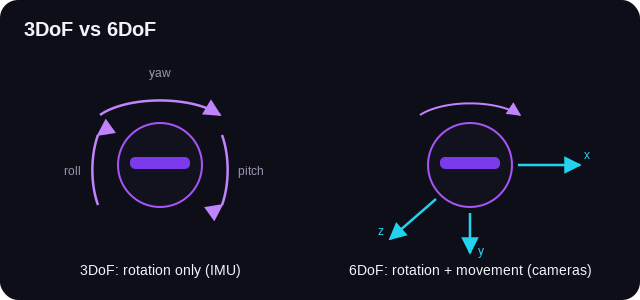
3DoF (three degrees of freedom) tracks rotation only: looking left/right, up/down and tilting your head. 6DoF adds movement through space: forward/back, left/right, up/down. With 3DoF a virtual screen can stay in front of you while you turn your head, but leaning in does nothing. With 6DoF you can walk up to an object and around it.
- 3DoF: IMU only, cheap and efficient; enough for movies and a floating monitor. Examples: XREAL One Pro (native 3DoF on its X1 chip), VITURE Luma Pro (3DoF via app).
- 6DoF: needs cameras plus computer vision, so more weight, heat and battery draw. Examples: XREAL AURA, RayNeo X3 Pro, Snap SPECS, Meta VR Glasses, Apple Vision Pro (M5).
SLAM, spatial mapping, planes and depth
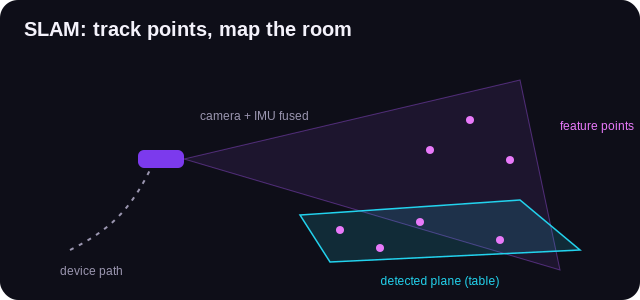
SLAM (simultaneous localization and mapping) tracks distinctive points in camera images over time and fuses them with IMU data. Together they estimate the device's position and build a sparse map of the room at the same time. On top of that map, software detects planes (floors, tables, walls) and builds depth or mesh models, so virtual objects can sit on a desk or hide behind a sofa.
- Pros: real world-locked content, no external base stations. Cons: compute and power hungry; struggles with blank walls, darkness, mirrors and fast motion.
- Examples: RayNeo X3 Pro (6DoF + SLAM), XREAL AURA (two world-facing tracking cameras), Snap SPECS.
Depth sensors: time-of-flight and stereo
Depth can be measured actively or computed. A time-of-flight (ToF) sensor emits infrared light and measures how long it takes to come back, giving a per-pixel depth image. Stereo depth compares two camera views and triangulates distance, the way your eyes do. Apple Vision Pro combines camera arrays with a LiDAR scanner; slim glasses mostly rely on stereo cameras or mono cameras plus motion.
- ToF pros: works on blank surfaces and in low light. ToF cons: extra power and parts, sunlight interference.
- Stereo pros: reuses tracking cameras. Stereo cons: weak on textureless surfaces, compute cost.
Hand tracking and gestures
Cameras watch your hands and a neural network estimates the joints of each finger. The software turns pinches, taps and swipes into input, so you don't need a controller. The alternative is sensing the gesture at the wrist: Meta's Neural Band reads electrical muscle signals (EMG) to control Meta Ray-Ban Display, even with your hand in your pocket.
- Pros: natural, no controller to carry. Cons: hands must stay in camera view; tired arms; less precise than buttons.
- Examples: Snap SPECS, XREAL AURA, Meta VR Glasses, Apple Vision Pro (M5); EMG: Meta Ray-Ban Display.
Eye tracking
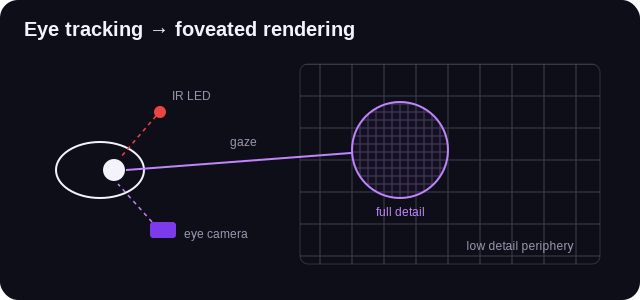
Small infrared LEDs light the eye and inward-facing cameras track the pupil and reflections to work out where you're looking. That enables foveated rendering: full detail only where you look, lower detail in your peripheral vision, which saves a lot of GPU work. It also enables gaze input ("look and pinch"), and helps with auto-calibration and accurate rendering for your eyes.
- Pros: big performance savings, fast intuitive input. Cons: more sensors and power; gaze data is highly personal (it can reveal attention and interest).
- Examples: Apple Vision Pro (M5), Meta VR Glasses. Still rare in everyday glasses.
Face recognition: why glasses (mostly) don't do it
Technically, a camera on your face plus a cloud model could identify strangers. Mainstream makers deliberately don't ship that: Snap states SPECS has no facial recognition, and Meta's AI glasses offer no face-identification feature. The reasons are legal (biometric data is heavily restricted under GDPR and several US state laws) and social: a camera that names people at eye level is exactly the scenario that makes people afraid of smart glasses. The visible safeguard today is the recording LED on Ray-Ban Meta, SPECS and XREAL AURA. It only helps if people nearby know what it means.
Our take
Sensing is the quiet half of the AR stack. 3DoF is solved and cheap, 6DoF is becoming standard in standalone glasses, and eye tracking is the next big upgrade for headsets. The harder question is not what the sensors can do, but what makers allow them to do. The face-recognition line is the one to watch.
Sources
- Wikipedia: Inertial measurement unit — https://en.wikipedia.org/wiki/Inertial_measurement_unit
- Wikipedia: Six degrees of freedom — https://en.wikipedia.org/wiki/Six_degrees_of_freedom
- Wikipedia: Simultaneous localization and mapping — https://en.wikipedia.org/wiki/Simultaneous_localization_and_mapping
- Wikipedia: Time-of-flight camera — https://en.wikipedia.org/wiki/Time-of-flight_camera
- Wikipedia: Eye tracking — https://en.wikipedia.org/wiki/Eye_tracking
- Wikipedia: Foveated rendering — https://en.wikipedia.org/wiki/Foveated_rendering
- Snap Specs — https://newsroom.snap.com/introducing-specs-augmented-reality-glasses
- XREAL AURA — https://www.xreal.com/aura
- XREAL One Pro — https://www.xreal.com/one-pro
- RayNeo X3 Pro — https://www.rayneo.com/products/x3-pro-ai-display-glasses
- Meta Ray-Ban Display — https://www.meta.com/ai-glasses/meta-ray-ban-display/
- Meta VR Glasses announcement — https://www.meta.com/blog/meta-vr-glasses-announcement-meta-connect/
- Meta AI glasses help center — https://www.meta.com/help/ai-glasses/
- Apple Vision Pro (M5) specs — https://support.apple.com/en-us/125436
See also: Display Tech explainer · device database.